What does this page do?
Certificates pull quantities and percentages from actual execution, calculate previous/current/total values, and include final calculation, amount in words, notes, and signatures.
Create certificates from actual execution.
Certificates pull quantities and percentages from actual execution, calculate previous/current/total values, and include final calculation, amount in words, notes, and signatures.
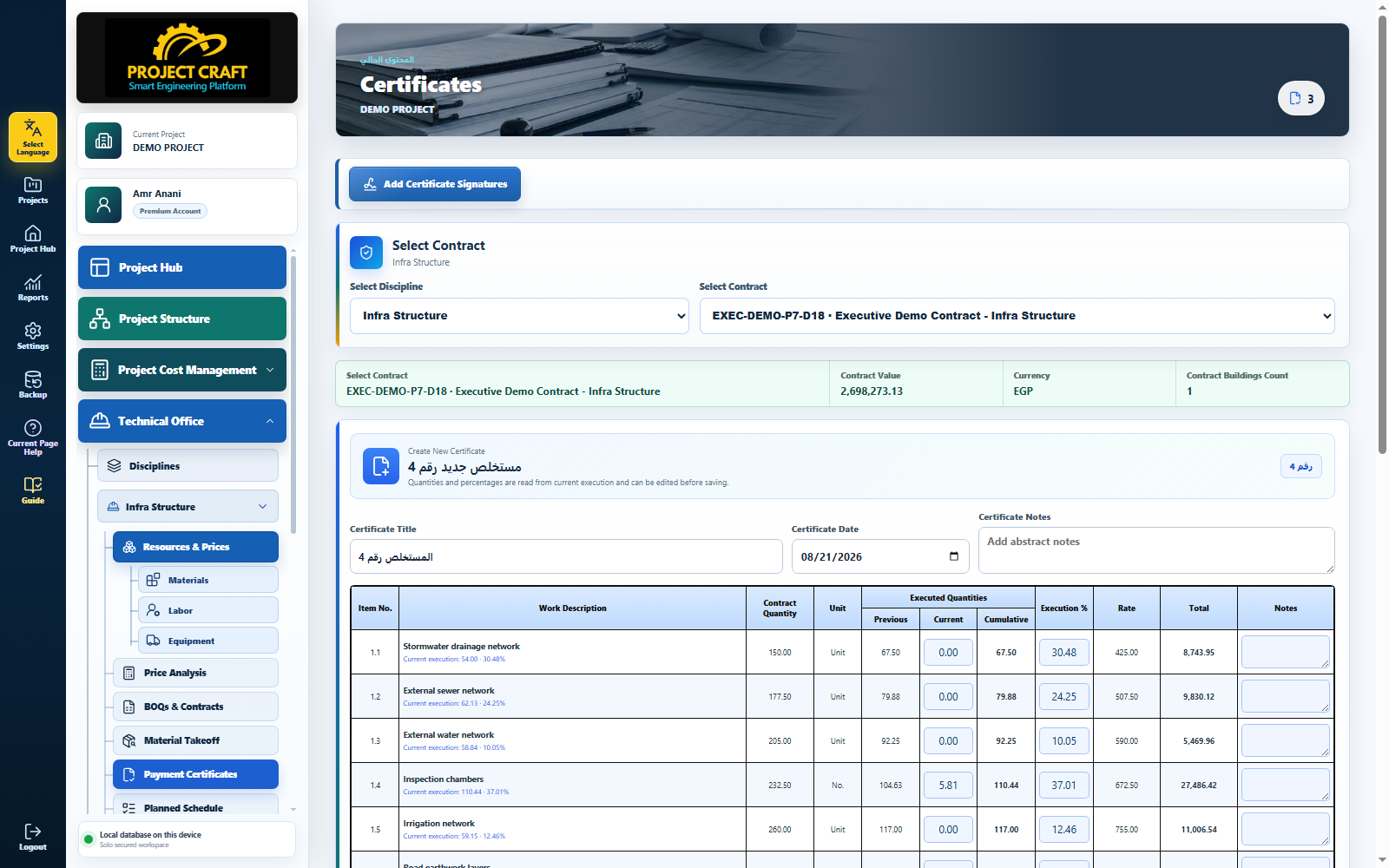
Choose the contract for the certificate.
Select contractTotal quantity comes from actual execution; current quantity is the difference from previous certificates.
Review quantitiesEnter additions, deductions, retention, and tax when needed.
Review final calculationOpen certificate signatures and save contract-specific signatures.
Add signaturesUse print preview to verify tables, signatures, and amount in words.
Print certificate| Field or action | Purpose inside the page |
|---|---|
| Select contract | Choose the contract for the certificate. |
| Review quantities | Total quantity comes from actual execution; current quantity is the difference from previous certificates. |
| Review final calculation | Enter additions, deductions, retention, and tax when needed. |
| Add signatures | Open certificate signatures and save contract-specific signatures. |
| Print certificate | Use print preview to verify tables, signatures, and amount in words. |